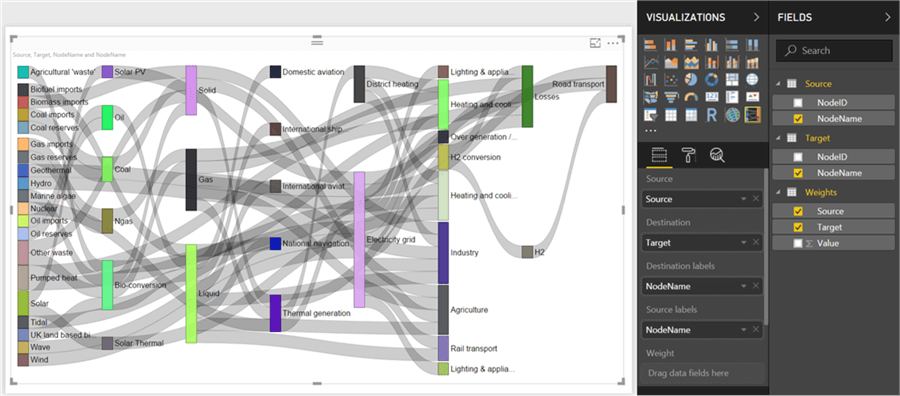
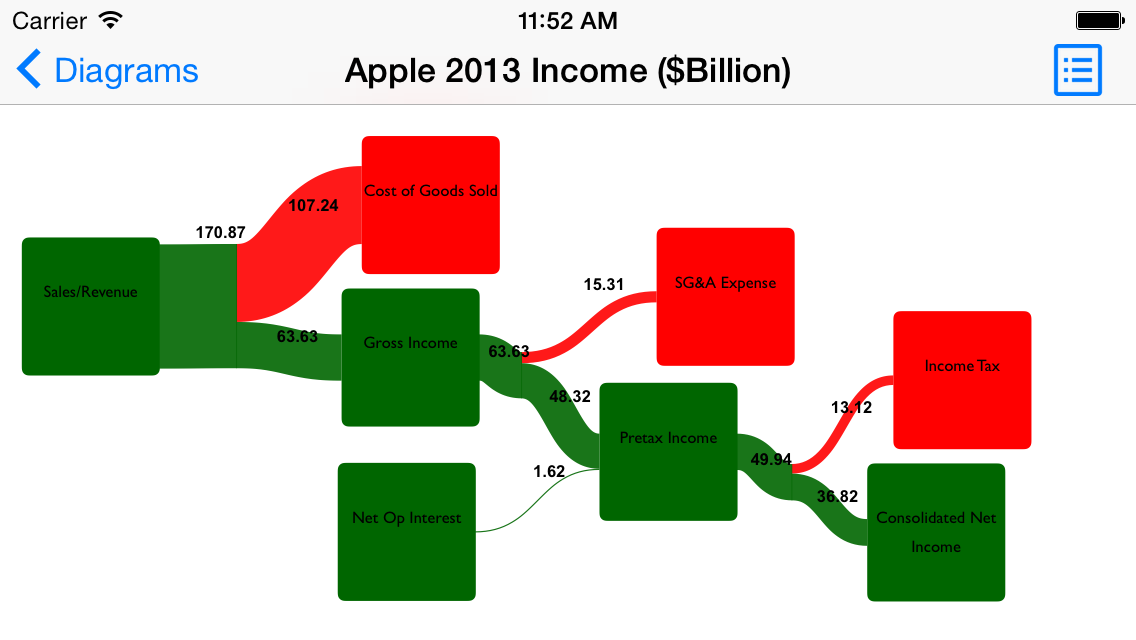
Gabor Doka has relased an updated version of his freeware tool Sankey Helper. The new version 2.4 has a macro for one-step default diagram generation, as well as enhanced colouring features such as using colours from data cells, and creation of colour hue variations. I haven’t tested the new release myself, but will keep you posted after doing so.

Just before the holidays a new version of e!Sankey became available. I had some time to play around with the new 2.5 release. Not that many new functions, it seems, but apparently some bug fixes and smaller improvements. The main new feature is the interface langauges in French, Portuguese and Spanish. The entry in my Sankey diagram software list has been updated accordingly.

Just came across a new piece of software for simple Sankey diagrams.
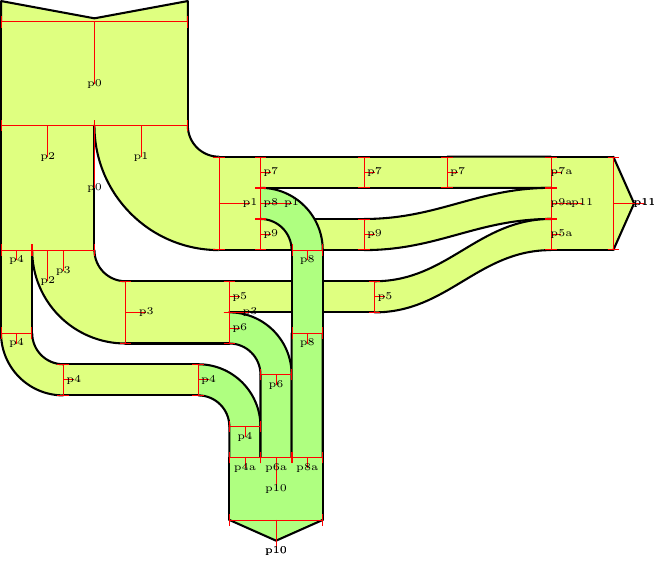
DrawSankey.m is a routine for Matlab that allows to produce diagrams like these:

Sample output of drawSankey.m plugin for Matlab from EPFL Lausanne.

DrawSankey.m is from the Industrial Energy Systems Laboratory (LENI) at Swiss EPFL in Lausanne. Find more information on their Wiki.

I haven’t tested it myself yet, but this definitely looks like an interesting add-on for Matlab users. I have added drawSankey.m to the Sankey software list.

For those of you interested in some of the maths behind drawing Sankey diagrams properly, you might want to read this article on ‘Programmatic Rendering of Directed, Weighted Graphs’ submitted for SVG Open 2003 by Philip A. Mansfield and Mark Ambachtsheer of SchemaSoft.

The authors consider Sankey diagrams as directed weighted graphs but they “can be difficult, time-consuming, and uninteresting to render by hand”. However, “Sankey diagrams do add an indisputable expressive power to a standard mathematical rendering of a graph…[and] when professionally constructed, Sankey diagrams represent flow in a manner … can be understood by anyone, instantly.”

Three diagrams are presented: a simple directed, weighted graph representing a candy factory, a pen-sketched B/W Sankey diagram, and the corresponding Sankey diagram in SVG format, created using data in XML format and XSLT style sheet transformation.

Candy factory: the raw materials quantities for the production of chocolate bars and caramel core candies are shown with a simple weighted, directed graph (Source: Mansfield/Ambachtsheer. Programmatic Rendering of Directed, Weighted Graphs, 2003)The same candy factory with a hand-drawn Sankey diagram (Source: Mansfield/Ambachtsheer. Programmatic Rendering of Directed, Weighted Graphs, 2003)Sankey diagram for the candy factory. A vector graphic has been created using XML and XSLT. (Source: Mansfield/Ambachtsheer. Programmatic Rendering of Directed, Weighted Graphs, 2003)

They also have some interesting details on graphical problems, such as overlay, edge layout, width of Sankey arrows in curves, etc. Basically all that stuff that developers of professional Sankey software tools have to cope with.

Just back from a short late summer holiday, enjoying a few “Sankey-free” days at the coast. To get going again I am presenting a Sankey diagram you might have seen already. It is Gabor Doka’s sample diagram for his ‘Sankey Helper’ application.

Sankey diagram created with Sankey Helper 2.1 (by G.Doka)

The tool comes as a Microsoft Excel workbook, with a number of macros and a toolbar that allows to create shapes and assignments from the data sheet to these shapes. Of course, graphical layout capacities of this helper tool is limited, however, simple diagrams can be drawn easily once you understand how to handle it.

Sankey Helper 2.1 is freeware – err, sorry! – “Sankeyware”. You must sent the author a Sankey diagram you created, but otherwise there is no cost. Nice idea! Download Sankey Helper from Gabor Doka’s website.

Good news upon my return from a summer break: e!Sankey 2.0 has been released by German software maker ifu Hamburg on July 15. I had participated in their beta testing in June, so I was well aware of what they would present…

The new version comes in two different flavours: a standard version and a “pro” version, which differs from the standard version by offering a ‘LiveLink’ for Excel files and material stocks visualization.

A full list of new features has been published in their BBS. Some are nice to have, such as the 40+ fill patterns or background colour for the diagram. Others are off real added value (at least in my eyes), such as rotating of labels, or padding at processes.

Padding at processes in e!Sankey 2.0 Image 1
Padding at processes in e!Sankey 2.0 Image 2
Padding at processes in e!Sankey 2.0 Image 3

The implementation of the interface to Microsoft Excel (so-called LiveLink) is a big push and definitely justifies the price difference of 60 Euro (110 US$) for the e!Sankey 2.0 pro version. You can copy & paste values from Excel into the quantity field for a flow, establishing a dynamic reference to the cell in the background (cells should be named, so that their postion can be changed without losing the reference to the e!Sankey diagram). If the value in the Excel file is changed, the flow quantity is automatically updated, and the diagram adapted accordingly. Read more about the Excel LiveLink.

A 30-day trial version can be downloaded here.

I will play around with e!Sankey 2.0 pro (after I have dug through my inbox :-( ) and present some more Sankey diagrams within the next days…

Visio Guy has been “messing around with … Sankey Diagram Shapes for Visio again — because [he] just couldn’t resist”. ;-)

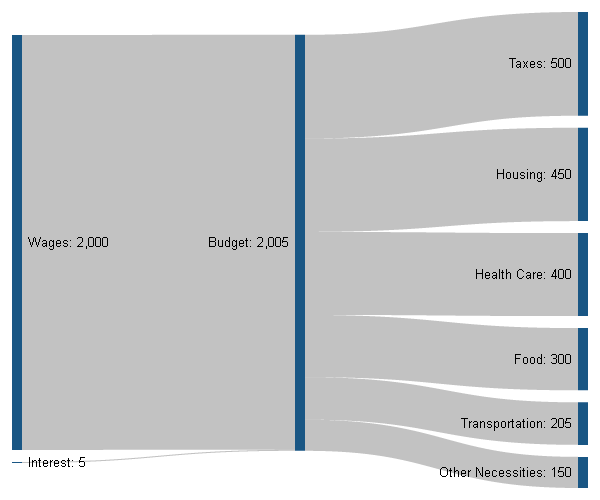
The result is a pre-wired Sankey diagram shape, in which five flows exit from a process box. The flows scale automatically according to the user input.

A Sankey diagram created with Visio using a set of five Sankey arrows pre-wired to a process box. Downloadable from Visio Guy's blog at http://www.visguy.com

VG’s example is fun, showing cost of living and what money is being spent on. I just hope his food spendings don’t spread 60/40 on chips and coffee… :-D

Read the full blog post. There is a download link for this Visio shape at the end.

This is an interesting one: Saveen Reddy shows a Sankey diagram-like breakdown of bugs in a software development project. The term ‘bug’ is used “…very generically to describe any issue being tracked, not only defects in source code.”.

Example of a (Sankey-style) diagram for bug tracking in software development (source: Savee Reddy's Blog)

This does not fully classify as a Sankey diagram, I think, because the arrows don’t seem to reflect any quantities (number of bugs, time spent on bugs, …). But just like the diagram that showed the number of people having been accused and the turnout of the cases I showed here in June 2007, it visualizes a sequence of breakdowns, leading to decisions that are taken (dashed line arrows).

Now, anybody wants to check their bug tracking tool and show a similar diagram but with real numbers?